
Skip to content
ConnectMyFile
CMF POS

The point of sale that doesn't stop when the internet does.

CMF runs on a box in your outlet. Dine-in, takeaway and delivery, KOT straight to the kitchen printer, and a day-close you can trust, whether or not the connection is up.
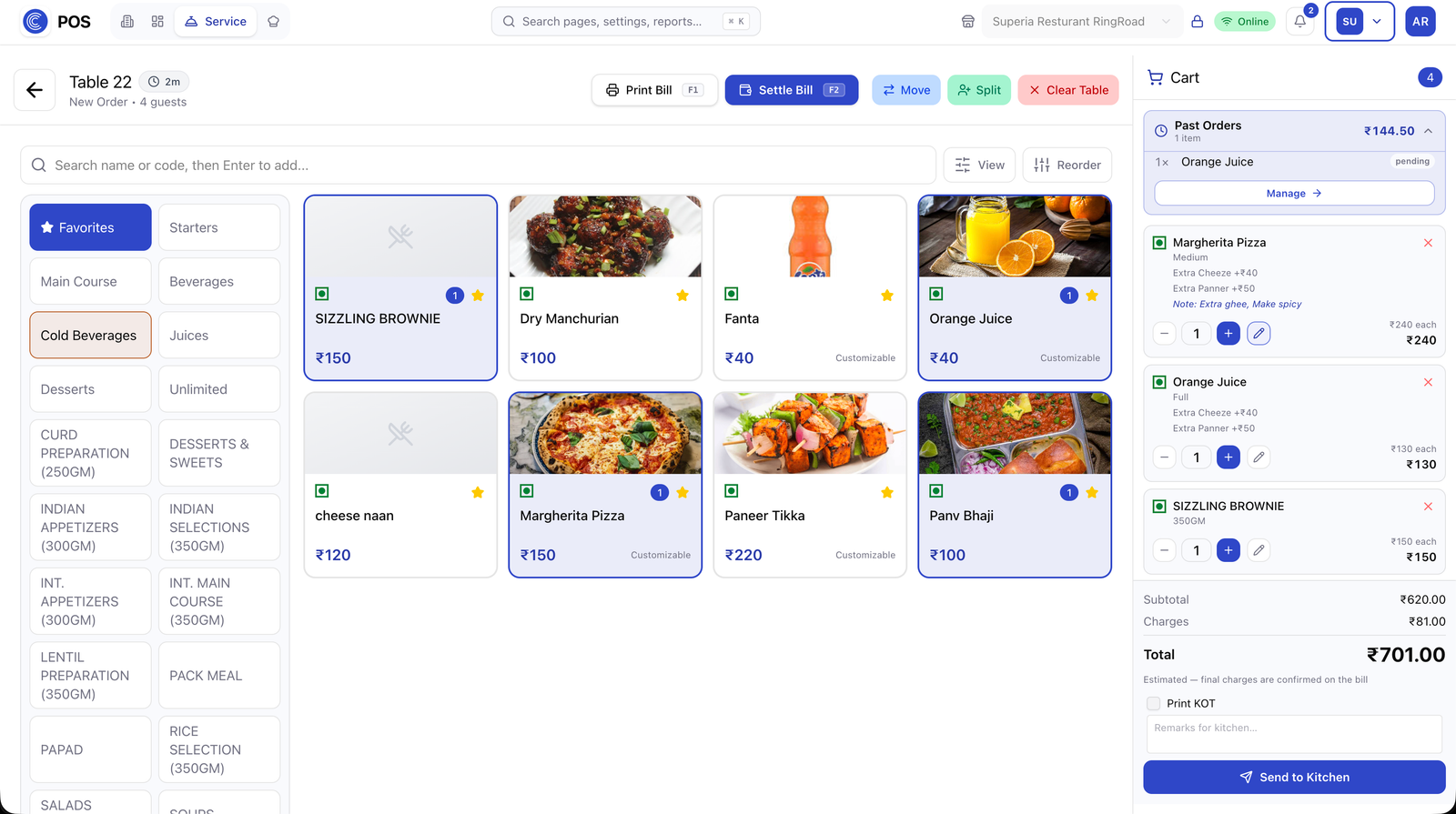
pos.connectmyfile.com/tables
CMF POS dashboard
0
downtime when offline
3
order types
<2s
to fire a KOT
1
day-close report
The end-to-end flow

From the first order to the day's close: eleven steps, one box.

01
Take the order

Table map for dine-in, quick-pick menu grid for takeaway, delivery with customer lookup. Modifiers, notes and course-wise firing.

Table map · takeaway grid · delivery lookup
Modifiers and kitchen notes per item
Course-wise firing
CMF POS: Take the order
Take the order
02
Fire the KOT

Items marked as kitchen items print to the right station automatically via the on-box print agent; the captain app on a phone can fire the same order tableside.
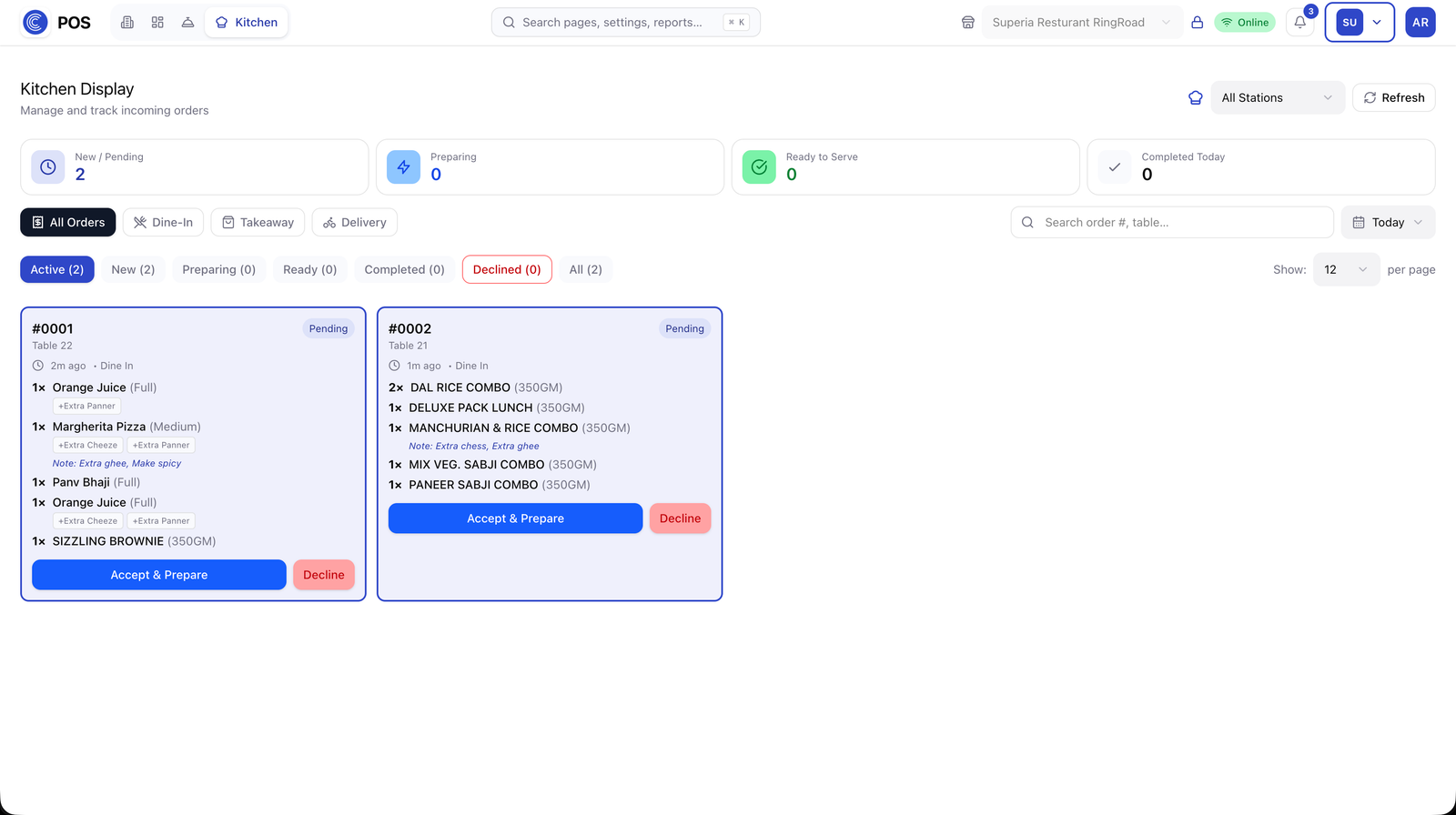
Station routing per item
On-box print agent, no cloud round-trip
Captain app fires tableside
CMF POS: Fire the KOT
Fire the KOT
03
Work the floor

Live table status, running bills, order-ready callbacks, item 86'ing, the whole floor on one screen.
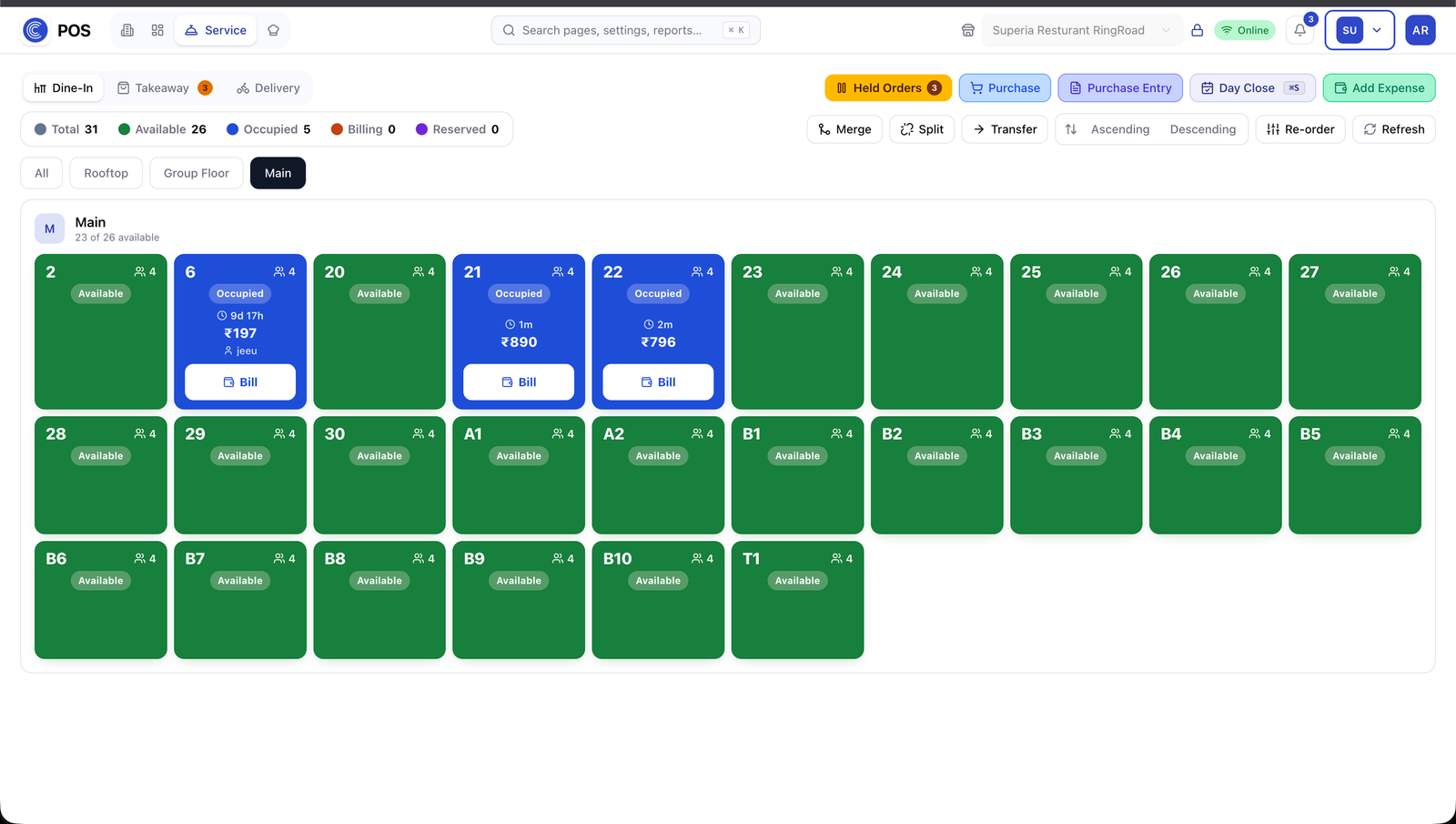
Occupied · billing · reserved at a glance
Merge, split and transfer tables
86 an item across all terminals
CMF POS: Work the floor
Work the floor
04
Settle the bill

Split by item or amount, multiple payment modes on one bill, discounts and comps with a reason, GST-compliant invoice printed or sent.
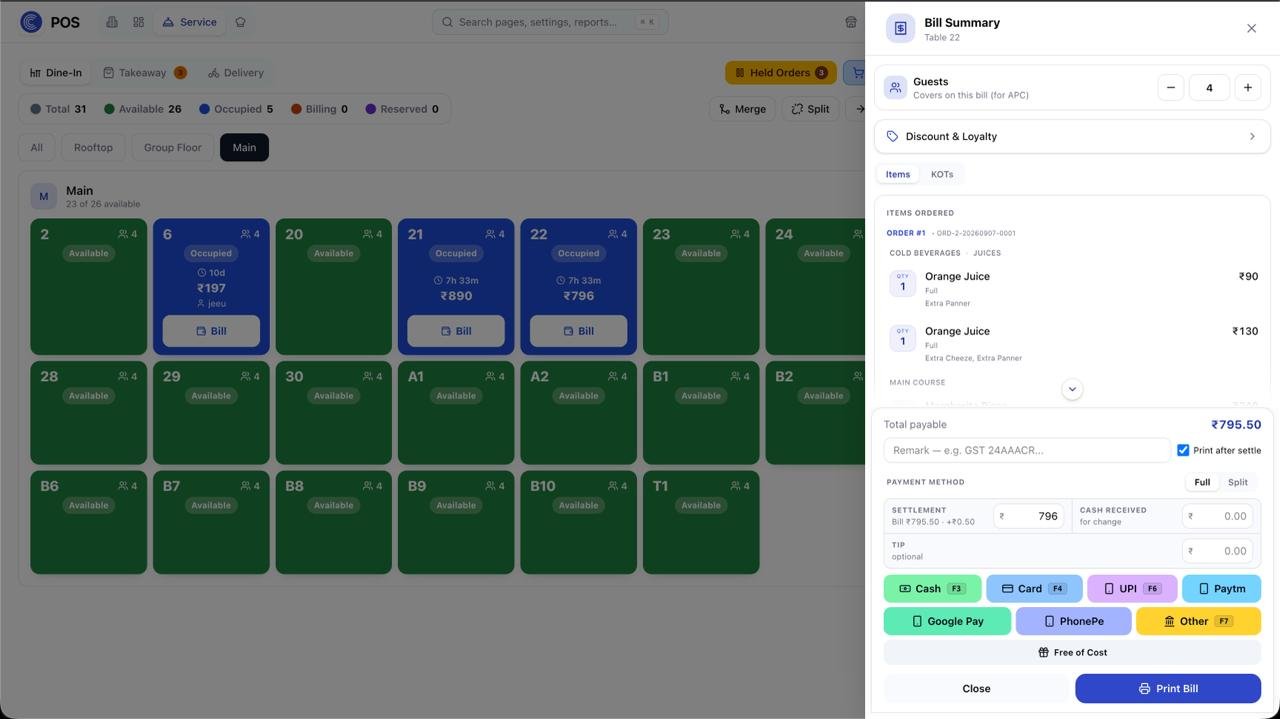
Split by item or amount
UPI + cash + card on one bill
Discount reasons captured
CMF POS: Settle the bill
Settle the bill
05
Book the purchase

Buy raw materials from vendors, or pull a KitchenHub order straight in as a bill. Line-wise GST, cash or credit, and the goods land in stock the moment it's posted.
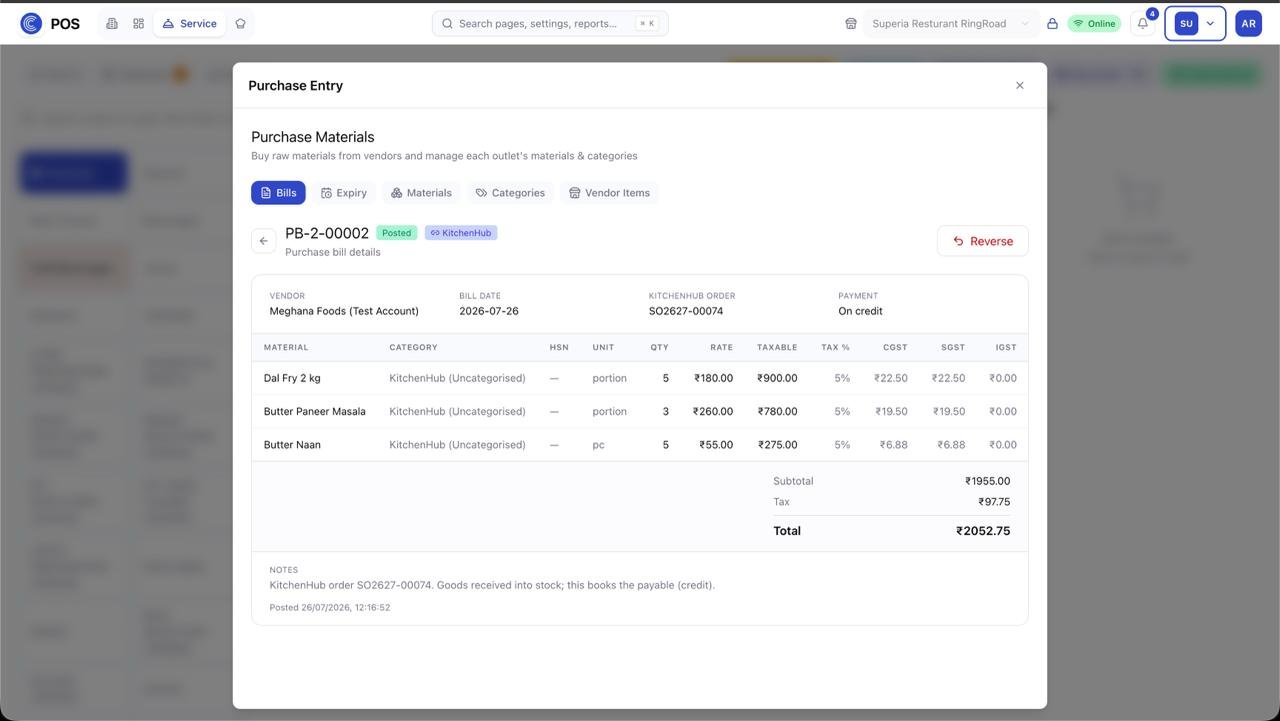
Line-wise HSN, CGST, SGST and IGST
KitchenHub order received as a purchase bill
On credit books the payable; reverse without losing history
CMF POS: Book the purchase
Book the purchase
06
Track stock in the outlet

Receive goods into Storage, transfer to Kitchen, both directions, with a running per-location quantity.
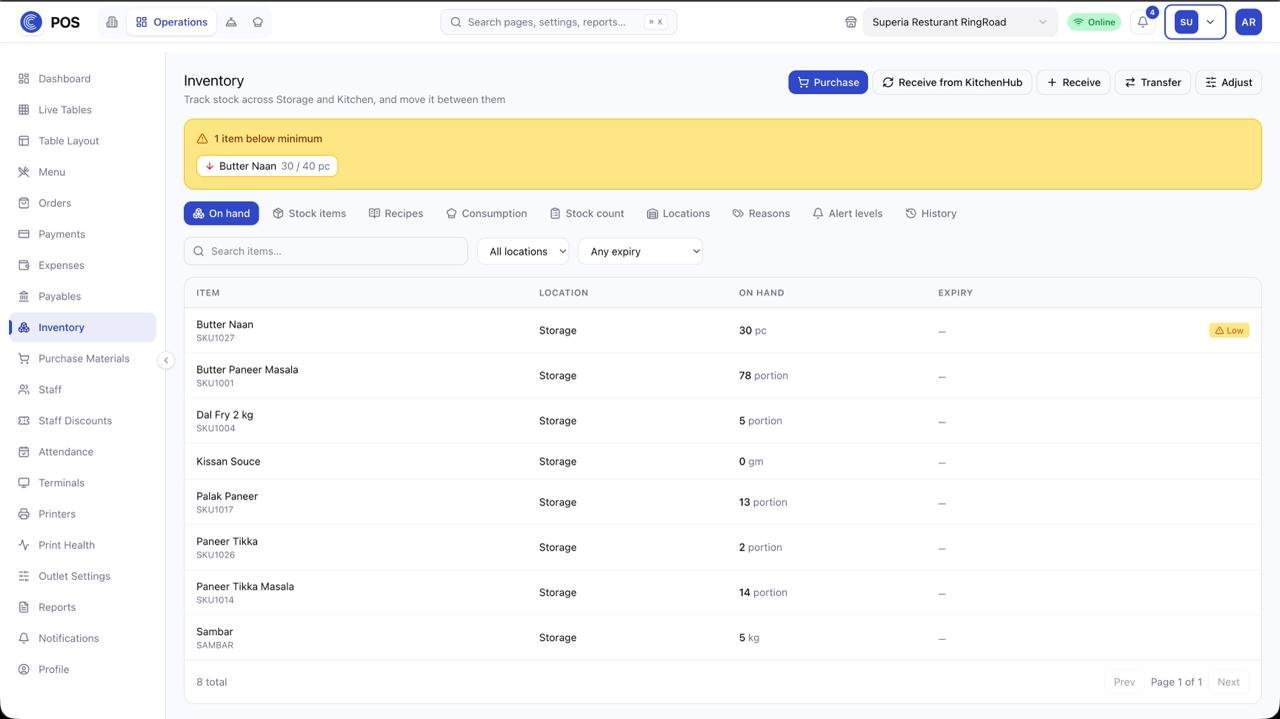
Receive against the KitchenHub challan
Storage ↔ Kitchen transfers
Per-location running quantity
CMF POS: Track stock in the outlet
Track stock in the outlet
07
Cost every dish with a recipe

Tie each dish to its stock items: yield, quantity per portion and a wastage percentage. Selling one portion deducts exactly that much from Storage and prices the plate for you.
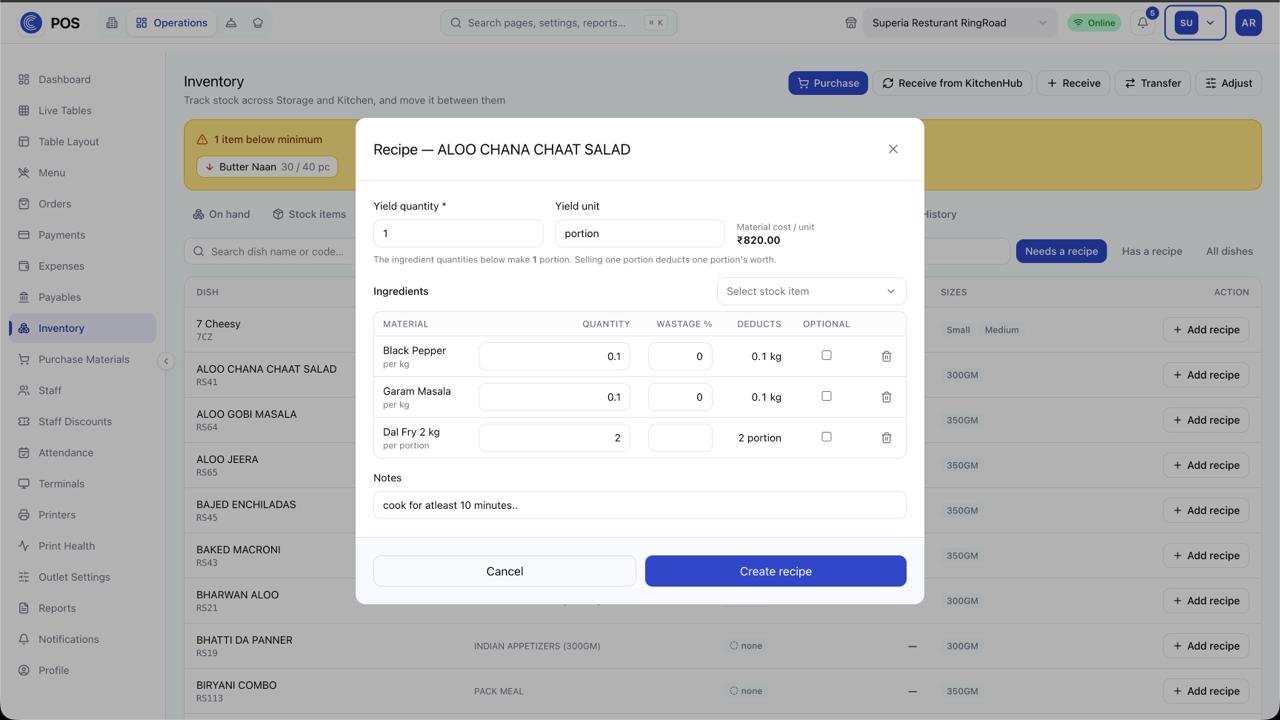
Ingredients with wastage % and per-portion deduction
Material cost per unit calculated live
Filter the dishes that still need a recipe
CMF POS: Cost every dish with a recipe
Cost every dish
08
Mark attendance

Present, half day or leave for any day on the calendar. Clock-ins fill themselves in, a manual entry pre-fills from the staff member's shift, and back-dated edits stay inside your manager edit window.
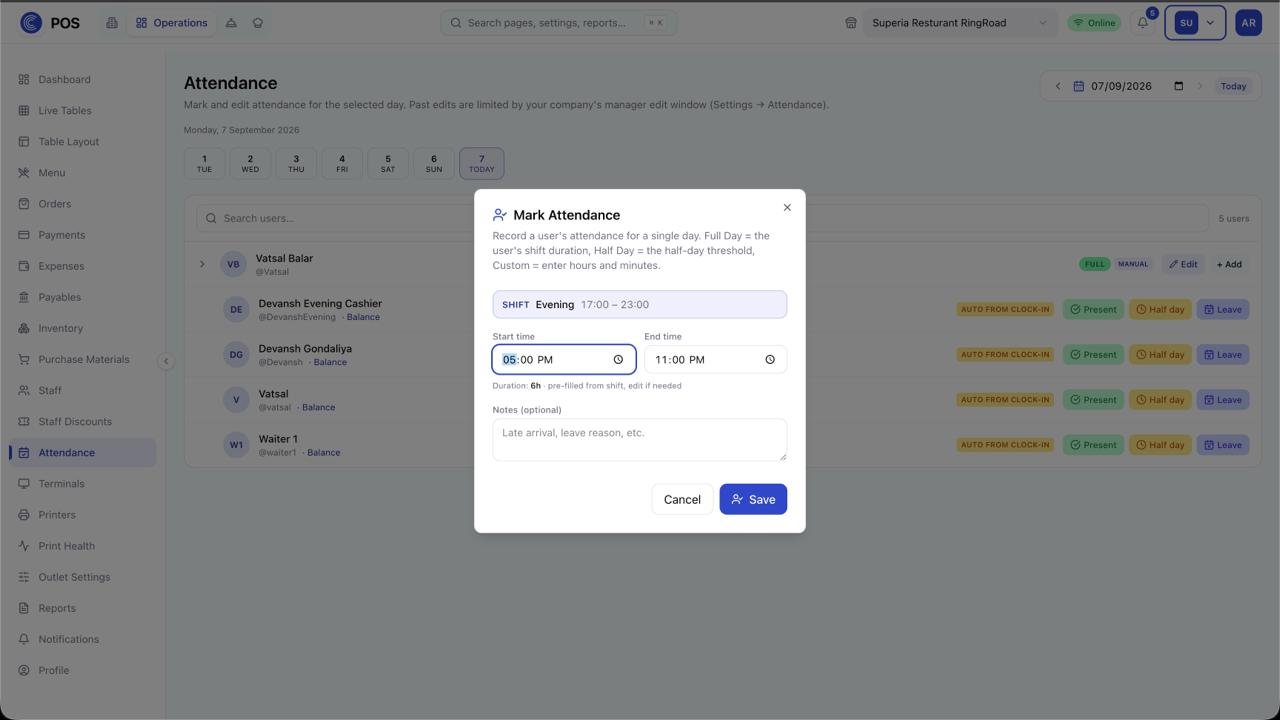
Present · half day · leave in one tap
Auto from clock-in, or hours entered by hand
Past edits limited by the manager edit window
CMF POS: Mark attendance
Mark attendance
09
Log the day's expenses

One day sheet for every rupee that leaves the counter: vendors and cost heads down the side, cash and credit across, with what earlier shifts recorded shown beside your own.
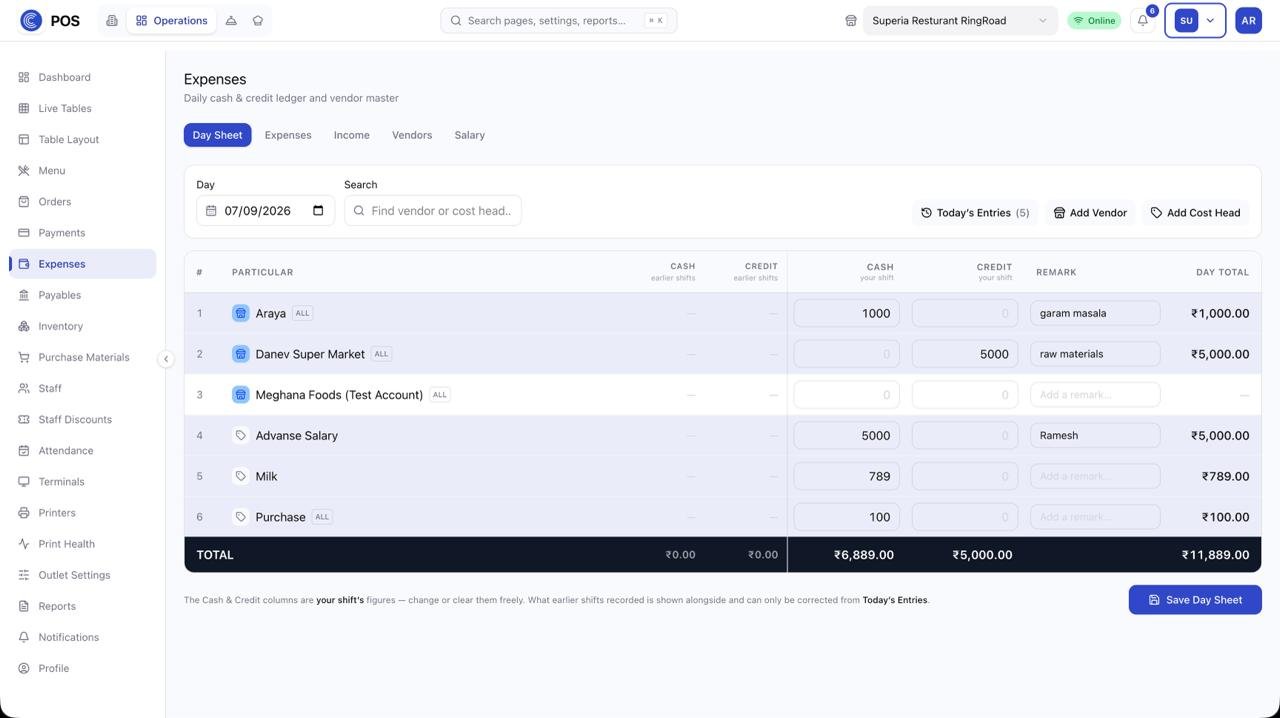
Vendors and cost heads on one sheet
Cash and credit split per shift
Remarks, day total and a signed-off save
CMF POS: Log the day's expenses
Log the expenses
10
Keep the customer coming back

Every bill earns points and moves the customer up Bronze to Platinum on its own. Redeem from the bill's discount and loyalty panel; walk-ins stay a separate contact list until they join.
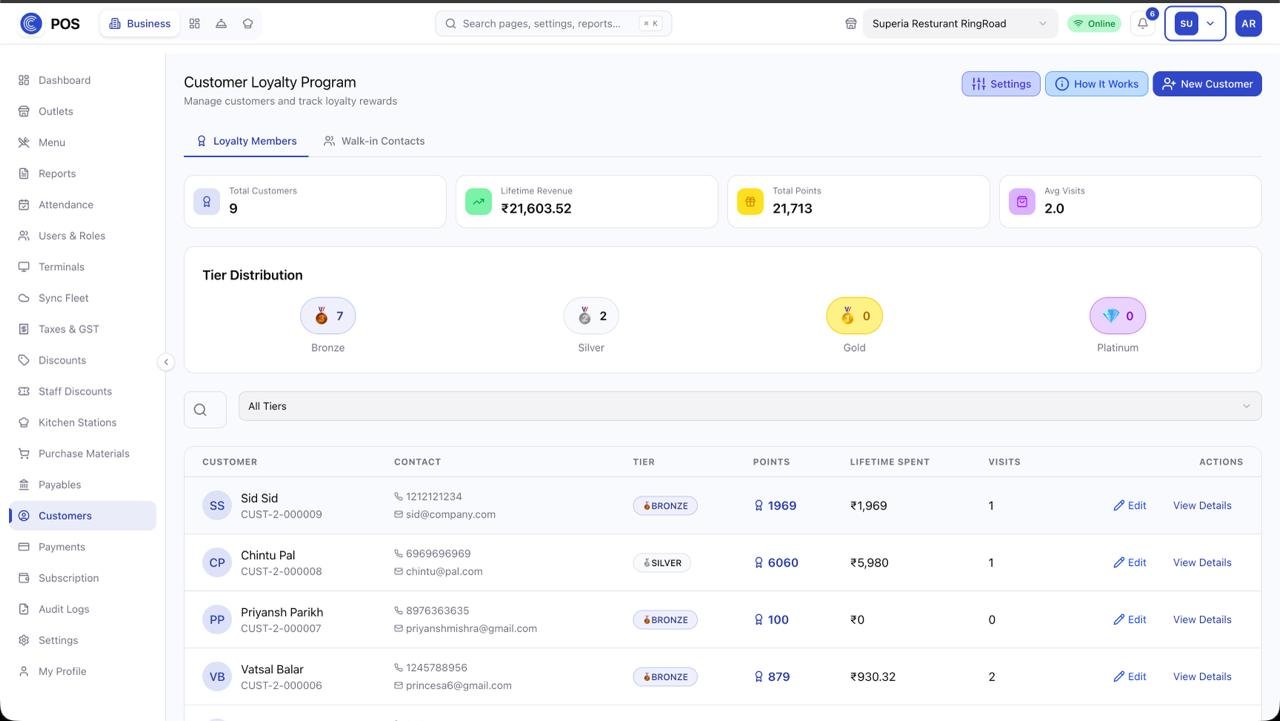
Points and tiers move with lifetime spend
Bronze · Silver · Gold · Platinum distribution
Redeem at settlement, right on the bill
CMF POS: Keep the customer coming back
Loyalty & customers
11
Close the day

Z-report, cash reconciliation, sales by item / hour / payment mode; the box syncs everything to the cloud.
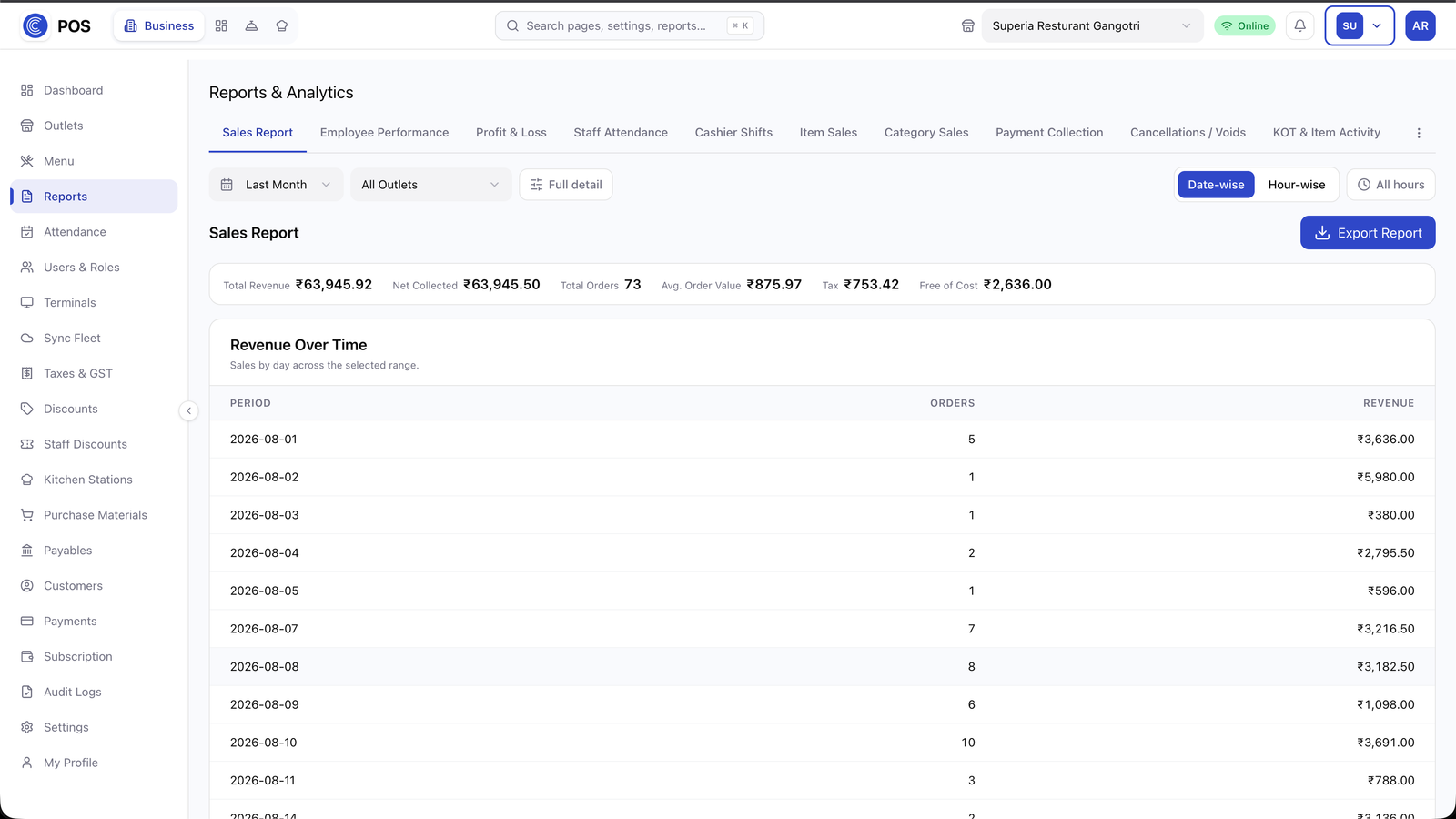
Z-report and cash reconciliation
Sales by item, hour and payment mode
Everything syncs to the cloud
CMF POS: Close the day
Close the day
Everything in the box
Table & floor management

Floors, sections, live status, merge and transfer.

KOT & station printing

Route items to the right printer automatically.

Captain app (Android)

Take and fire orders tableside on a phone.

Split billing & multi-payment

By item or amount; several modes on one bill.

Discounts, comps & reasons

Every reduction carries a reason and an approver.

GST invoicing

Compliant invoices, printed or sent.

Offline-first box with auto-sync

Bill all day without internet; sync on return.

Multi-outlet under one brand

Same menu masters, per-outlet pricing.

Shift, cash & day-close reporting

Z-report, cash variance, hourly sales.

Works with the rest of CMF

Not an integration. The same record.

Purchases raised here become customer orders in KitchenHub.

This outlet is the same site CMF Audit schedules audits against.

CMF POSKitchenHubCMF Auditsame outlet · same user
Roles that use it
CashierBilling screen and settle modal
CaptainCaptain app · table order
Store ManagerDay-close, purchases and stock
Brand OwnerOutlet overview across sites
Specs
Deployment
In-store box (Linux) + cloud console
Platform
Web terminals, Android captain app
Offline behaviour
Full billing, KOT and day-close offline; sync on reconnect
Integrations
KitchenHub ordering, CMF Audit, UPI/card gateways, GST e-invoice
CMF FAQ

Before you ask.

Yes. CMF runs standalone; KitchenHub and Audit switch on later without migration.

See CMF running on your own menu.

A 30-minute walkthrough on your data. No commitment.